 Mega4up
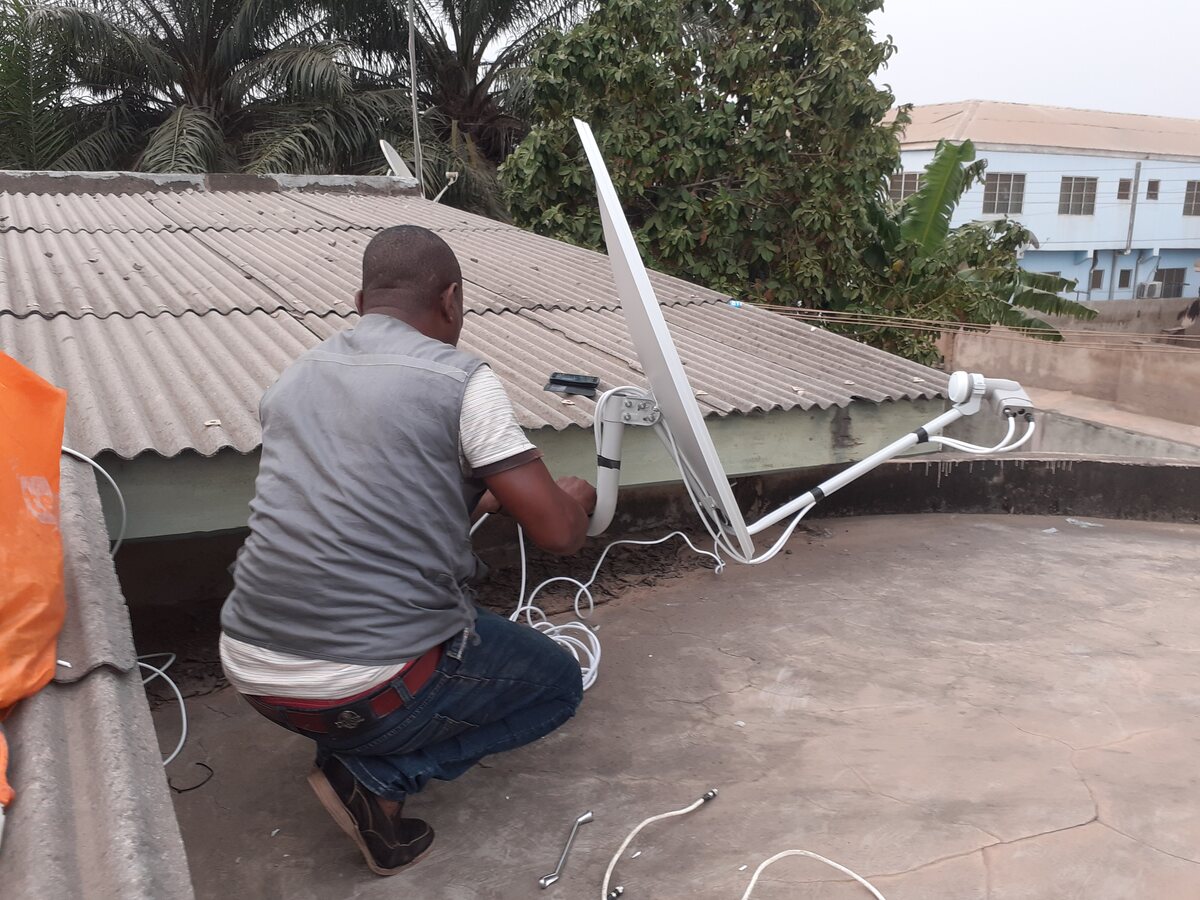

Set the elevation for your city and lock it, then turn the dish left and right very slowly while watching the receiver’s Quality bar. That is the whole method. When people spend an afternoon on the roof and get nothing, it is almost always because they swept too fast or trusted the Strength bar.
Every Nilesat satellite sits at 7° West, a slot shared with Eutelsat 7 West A. One dish on 7°W picks up everything broadcast from there.
In this guide
Before you go up
- A spanner that fits the mount, and a small spirit level for the pole.
- The receiver and a small TV near the dish, a satellite finder meter fitted between the LNB and the cable, or someone indoors reading the signal bars to you over the phone.
- A working Universal LNB and an undented dish.
- Cable with properly fitted F connectors. A loose connector can have you hunting for a satellite you are already pointing at.
1. Get the numbers for your own address
Angles change from city to city, so do not borrow a relative’s settings. Open a calculator such as DishPointer, drop a pin on your home and select Nilesat 201/301 or any satellite at 7.0W. You get three values: elevation, azimuth (shown as true and magnetic) and LNB skew.
Look at the line it draws on the map. If it runs straight through a tall building or tree, move the mount now rather than discovering it an hour later.
Approximate values for a few cities, for illustration only:
| City | Azimuth (approx.) | Elevation (approx.) |
|---|---|---|
| Cairo | 238° (southwest) | 36° |
| Riyadh | 253° | 25° |
| Baghdad | 246° | 23° |
| Algiers | 197° (almost south) | 46° |
| Casablanca | 179° (south) | 51° |
The pattern is worth remembering: from Egypt, the Gulf and Iraq the satellite is low in the southwest, and the further west you go in North Africa, the closer it moves to due south and the higher it climbs.
2. Plumb the pole, then set elevation
Check the pole with a level on two sides. A leaning pole lets you find the satellite but never peak it properly, because every angle after that is slightly off. This is behind many dishes that “work but break up”.
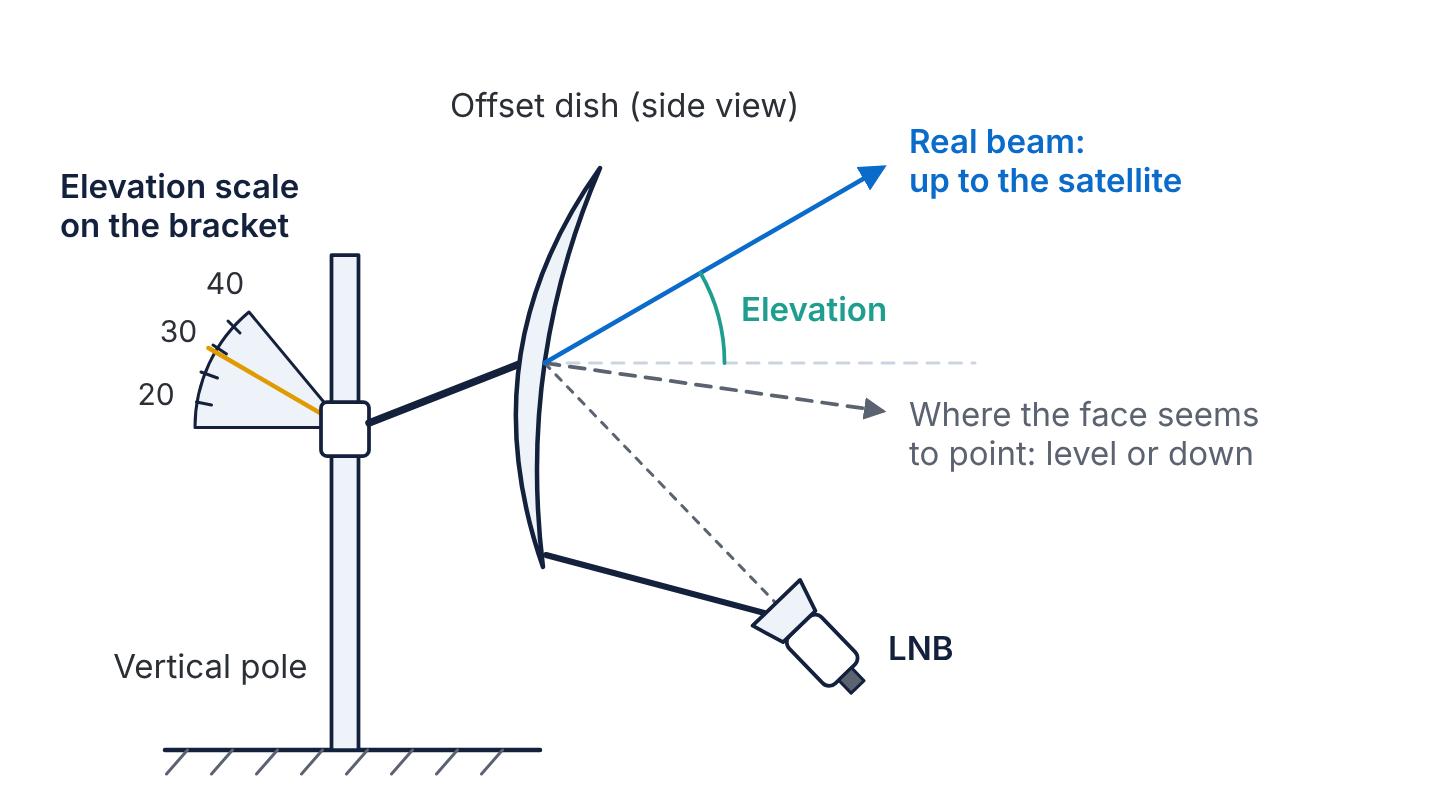
Fit the dish and tighten the nuts just enough that it turns with a light push but stays put on its own. Set the elevation on the scale printed on the bracket.
Most home dishes are offset dishes, with part of the tilt built into the shape. The face will look almost vertical, as if it is aiming too low. It is not.
3. Set the LNB skew
Skew is the rotation of the LNB in its holder. Start upright at zero, then rotate by the amount and direction the calculator shows. In Cairo the skew is large, in the region of 45 degrees; in Casablanca, which sits almost under the satellite’s longitude, it is close to zero.
If the calculator’s diagram leaves you unsure which way to turn, leave it near zero and tweak it at the end while watching quality. The gain is small, but it is margin you will be glad of in heavy rain.
4. Find and peak the signal
- Connect the cable with the receiver off, switch on and open the installation menu (Installation or Antenna Setup, depending on the model).
- Select Nilesat, LNB type Universal (9750/10600), LNB Power on, and DiSEqC set to None if there is no switch in the line.
- Pick a frequency that is active now, from Nilesat’s official channel search or a maintained list such as KingOfSat.
- Point the dish roughly with your phone compass, using the calculator’s magnetic azimuth. Stand away from the steel pole when you read it.
- Turn the dish about one degree at a time and pause for two seconds. The meter lags, and quick sweeps skip right past the satellite.
- When Quality appears, stop and make smaller moves until it peaks.
- Nudge elevation up and down the same way, then fine-tune skew.
- Tighten everything while watching the meter. Tightening can shift the dish; if quality drops, loosen slightly and redo it.
- Scan and confirm you get channels on both horizontal (H) and vertical (V) transponders.
A cheap finder meter that beeps louder as signal rises is genuinely useful up there, but it reacts to any satellite and cannot tell you which one. Plenty of dishes have been bolted onto the neighbouring satellite because the meter screamed. Nilesat channels appearing on the receiver is the only real confirmation.
Where it usually goes wrong
- Trusting strength. The LNB produces noise, so Strength shows something even when the dish is pointing at nothing. Quality only appears when the receiver locks onto the right transponder.
- Wrong satellite. Quality shows but the scan brings strange channels: go back to the calculated azimuth instead of carrying on in the same direction.
- Horizontal works, vertical does not? That is rarely an alignment problem. Suspect the LNB or cable; our guide to fixing No Signal on a receiver covers the checks.
- Nuts left half tight, so the first strong wind undoes your work.
When to hand it to an installer
Do not go up if the roof has no parapet, the dish sits near an edge, or overhead power lines are close. Never work in rain or wind; a dish acts like a sail. Unplug the receiver before connecting or disconnecting the cable.
If you have swept the whole arc slowly and Quality never appears, the problem is probably the LNB, the cable or a setting, not your technique. An installer’s meter shows the satellite name directly and can save you hours. If you are still choosing hardware, see how to pick the right dish size first.