 Mega4up

No Signal on a satellite receiver is usually a connector, a setting or a dish that has been knocked, not a dead box. The fastest route to a fix is the signal screen: the Strength and Quality bars tell you where to look before anyone climbs onto the roof. Then start from what you are actually seeing, and change one thing at a time so you know what solved it.
In this guide
- Read the two bars before anything else
- Two minutes of diagnosis
- Every channel lost after a factory reset or update
- Every channel lost after wind
- An LNB Short or Antenna Overload message
- Picture dies in rain, then returns
- Horizontal channels work but vertical do not (or the reverse)
- Picture is there but quality is low or breaks up
- Still nothing? The checks people skip
- When to call an installer
Read the two bars before anything else
Tune to any channel on your satellite and open the signal screen (often Info pressed twice, or the red button, depending on the model).
- Strength is how much is arriving on the cable, noise included.
- Quality is whether the receiver can decode the transponder cleanly. This is the bar that matters.
The LNB generates electronic noise of its own and amplifies it along with any signal, so a working LNB shows some strength even with the dish pointing at the ground. Quality only rises when the receiver locks onto the right transponder, on the right satellite, with the right settings. That is why you can see 80% strength, zero quality and a black screen, and why a dish is never aligned on the strength bar.
| Strength | Quality | Usually means |
|---|---|---|
| Zero | Zero | Nothing arriving: broken cable, loose connector, LNB Power off, or dead LNB |
| Present | Zero | Dish not on the selected satellite, or a wrong setting (LNB type, DiSEqC, frequency) |
| Present | Low, fluctuating | Close but not peaked, water in a connector, or rain |
| Present | High, steady | Dish is fine; the problem is the channel itself (it moved or stopped) |
Two minutes of diagnosis
- Is it every channel, or only one or a few on the same frequency? A single channel usually means it moved or stopped. Look up its current frequency on the satellite operator’s or channel’s own site and add it manually with the right frequency, polarization and symbol rate.
- Is another receiver running off the same dish? If it works, the fault is in your box or its cable.
- What changed recently? Wind, heavy rain, someone on the roof, a firmware update, a factory reset.
Then do the free fix: unplug the receiver at the wall for a full minute, not just standby, and switch it back on.
Every channel lost after a factory reset or update
The classic one. The reset puts the antenna settings back to defaults that do not match your installation. Open Installation or Antenna Setup and check:
- The selected satellite matches where the dish points.
- LNB type is Universal, 9750/10600, and LNB Power is on.
- DiSEqC is None or Disabled if you have a single dish and LNB with no switch. If you do have a switch, each satellite must be on its correct port. Wrong ports are one of the most common causes of No Signal after a reset; our DiSEqC setup guide walks through it.
- 22KHz is on Auto with a Universal LNB, unless you use a 22 kHz switch between two dishes.
Go back to the signal screen after each change. If quality jumps off zero, you have found it and the roof can wait.
Every channel lost after wind
The dish has probably moved. Look at it from the ground first: has it rotated on the pole, is the LNB arm bent, is the LNB still seated in its holder? Loose nuts are the giveaway, and neighbouring dishes on the same satellite show roughly where it should point. Realigning is covered in aligning a dish to Nilesat; peak it on quality, not strength. Only go up if the roof is safe, away from power lines and edges, and never in wind or rain.
An LNB Short or Antenna Overload message
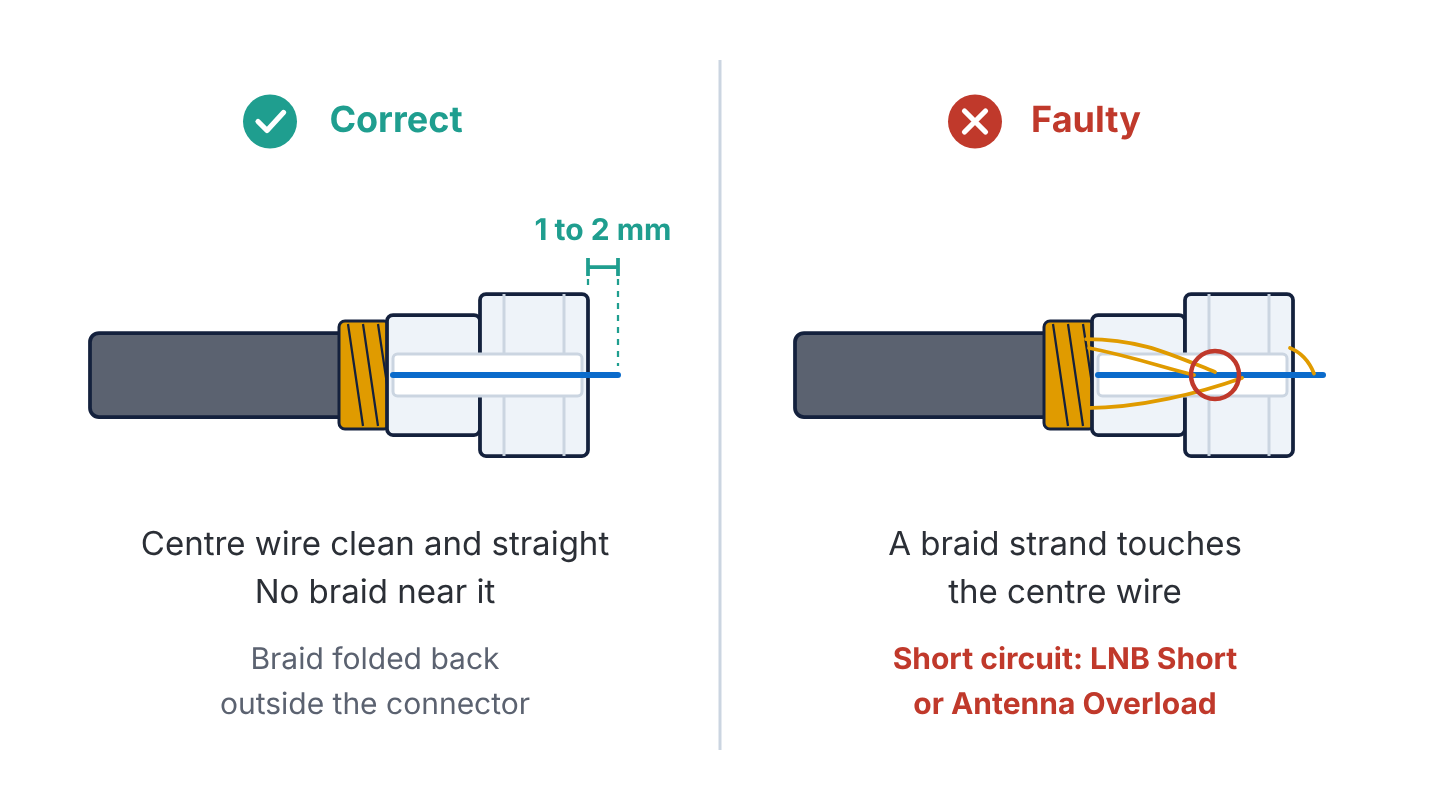
Unplug the receiver straight away. There is a short circuit, almost always a stray strand of the cable braid touching the centre conductor inside an F connector, or water in the outdoor connector.
- Unscrew the connector at the LNB. The centre wire should stand out roughly 1 to 2 mm, clean and straight, with no braid near it.
- Green corrosion or moisture means cutting back the cable and fitting a new connector.
- Follow the cable route for crushing in a window or door, sharp bends or cuts.
Picture dies in rain, then returns
Heavy rain weakens Ku-band signals and can cut them completely until it passes. Wait it out before touching anything; re-aiming in a storm peaks the dish on a temporarily weak signal. If even light rain kills the picture every time, your margin is too thin. Our page on rain fade and what really helps covers the fixes in order of cost.
Horizontal channels work but vertical do not (or the reverse)
The receiver switches polarization by changing the voltage on the cable, so a fault here points at the LNB or the cable rather than the dish direction. Check the connectors first, then swap in a known good LNB. LNBs are inexpensive and wear out with heat, humidity and age.
Picture is there but quality is low or breaks up
The dish is on the right satellite, but the margin is thin. First, percentages differ between receivers: 60% on one box may equal 40% on another with the same dish, because each maker maps its measurement differently. Do not compare your figure with a neighbour’s receiver of another brand.
- Note the quality on an HD channel on a clear day.
- Note the reading at which the picture starts to break up, for example in the next shower. That is your receiver’s threshold.
- The gap between the two is your margin. If it is small, peak the dish and check the connector before thinking about a bigger dish.
Some receivers show quality in decibels as C/N, SNR or MER. According to the DVB-S2 tables, QPSK at code rate 3/4 needs about 4 dB for error-free reception and 8PSK at 2/3 needs about 6.6 dB. So on an 8PSK HD channel, 9 to 10 dB or more is a reasonable margin; around 7 dB, expect breakups in the first heavy shower, with HD channels going first.
Quality also varies between transponders on the same satellite, because each can use a different power, beam and modulation. Peak the dish on a middling or weak transponder: if the weak one is solid, the rest will be too. Move the dish very slowly (the display lags a second or two), then fine-tune LNB skew by rotating it slightly in its clamp, which alone can add several points.
Do not fit an amplifier to push the strength bar up. Strength will rise, quality will not, because quality depends on how clean the signal is, not how much of it there is.
Still nothing? The checks people skip
- The cable is in LNB IN, not LOOP OUT. This gets swapped surprisingly often after a box is moved.
- Any splitter or switch in the line: connect the LNB straight to the receiver to rule it out.
- Something new in front of the dish: a grown tree, a new building, laundry, a neighbour’s dish.
- A dented dish face scatters the signal.
- Last of all, the receiver: try another box on the same cable, or yours on a dish known to work.
When to call an installer
If the dish is somewhere risky to reach, or you have been through every check without luck. An installer’s meter shows whether a signal is reaching the LNB at all, which separates a dish problem from a cable problem in minutes.